

DPDK是一个运行在用户态的程序。它通过卸载原来的linux对应网卡驱动,加载它本身由各个驱动组成的链接库,通过控制固定的核数,来专门进行轮询式网卡收发包的一款软件。
通过开源github库编译出来的dpdk工具箱会放在/build目录下,大概这样:
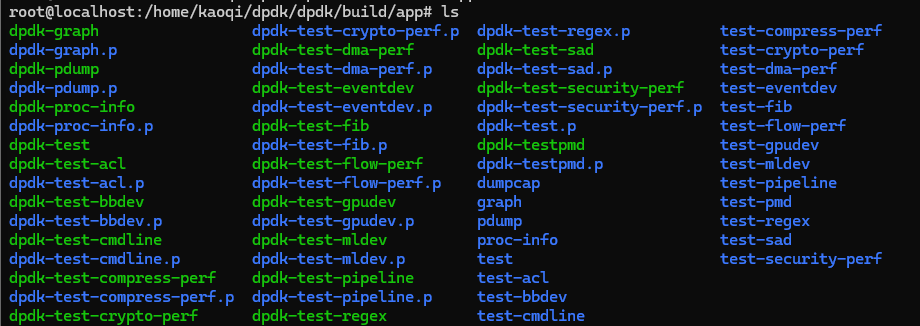
这里,需要根据不同的工具,进行一个罗列。
核心工具
1、dpdk-testpmd
这是DPDK最著名的交互式数据包处理测试应用,主要用于测试网卡的基本收发功能、性能基准测试、验证硬件卸载功能以及简单的流量转发。支持io、mac、mac_retry、flowgen等模式的转发。
2、dpdk-proc-info
显示DPDK进程的资源使用情况,用于查看内存池、环形队列、以太网统计信息、CPU核心映射等。
3、dpdk-pdump
用户态数据包捕获工具,抓取并保存为pcap格式的文件
testpmd命令
testpmd的help打印为:
root@localhost:/home/kaoqi/dpdk/dpdk/build/app# ./dpdk-testpmd --help
usage: ./dpdk-testpmd <DPDK EAL options> -- <App options>

options:
 -h, --help                 show this help message and exit.
 --auto-probing             Let EAL probe all available devices unless some -a/-b option is set.
 -a, --allow                Add device to allow-list, causing DPDK to only use specified devices
 --base-virtaddr            Base virtual address to reserve memory
 -b, --block                Add device to block-list, preventing DPDK from using the device
 -c, --coremask             [Deprecated] Hexadecimal bitmask of cores to use
 -d, --driver-path          Path to external driver shared object, or directory of drivers
 --force-max-simd-bitwidth  Set max SIMD bitwidth to use in vector code paths
 --huge-unlink              Unlink hugetlbfs files on exit (existing|always|never)
 --in-memory                DPDK should not create shared mmap files in filesystem (disables secondary process support)
 --iova-mode                IOVA mapping mode, physical (pa)/virtual (va)
 -l, --lcores               List of CPU cores to use
 --legacy-mem               Enable legacy memory behavior
 --log-color                Enable/disable color in log output
 --log-level                Log level for loggers; use log-level=help for list of log types and levels
 --log-timestamp            Enable/disable timestamp in log output
 --main-lcore               Select which core to use for the main thread
 --mbuf-pool-ops-name       User defined mbuf default pool ops name
 -n, --memory-channels      Number of memory channels per socket
 -r, --memory-ranks         Force number of memory ranks (don't detect)
 -m, --memory-size          Total size of memory to allocate initially
 -A, --no-auto-probing      Do not probe any devices unless some -a option is set
 --no-hpet                  Disable HPET timer
 --no-huge                  Disable hugetlbfs support
 --no-pci                   Disable all PCI devices
 --no-shconf                Disable shared config file generation
 --no-telemetry             Disable telemetry
 --pagesz-mem               Memory allocation per hugepage size (format: <pagesz>:<limit>, e.g. 2M:32G). Repeat option for multiple page sizes.
 --proc-type                Type of process (primary|secondary|auto)
 -R, --remap-lcore-ids      Remap lcore IDs to be contiguous starting from 0, or supplied value
 -S, --service-corelist     List of cores to use for service threads
 -s, --service-coremask     [Deprecated] Bitmask of cores to use for service threads
 --single-file-segments     Store all pages within single files (per-page-size, per-node)
 --telemetry                Enable telemetry
 --vdev                     Add a virtual device to the system; format=<driver><id>[,key=val,...]
 --vmware-tsc-map           Use VMware TSC mapping instead of native RDTSC
 -v, --version              Show version
 --syslog                   Log to syslog (and optionally set facility)
 --trace                    Enable trace based on regular expression trace name
 --trace-bufsz              Trace buffer size
 --trace-dir                Trace directory
 --trace-mode               Trace mode
 --create-uio-dev           Create /dev/uioX devices
 --file-prefix              Base filename of hugetlbfs files
 --huge-dir                 Directory for hugepage files
 --huge-worker-stack        Allocate worker thread stacks from hugepage memory, with optional size (kB)
 --match-allocations        Free hugepages exactly as allocated
 --numa-mem                 Memory to allocate on NUMA nodes (comma separated values)
 --numa-limit               Limit memory allocation on NUMA nodes (comma separated values)
 --socket-mem               Alias for --numa-mem
 --socket-limit             Alias for --numa-limit
 --vfio-intr                VFIO interrupt mode (legacy|msi|msix)
 --vfio-vf-token            VF token (UUID) shared between SR-IOV PF and VFs

For more information on EAL options, see the DPDK documentation at:
        https://doc.dpdk.org/guides/linux_gsg/
这需要单独开一篇文章来细讲一下这里的参数含义。